A schedule in most tools is a contract written before the work is understood - which is why most schedules are fiction by week three. Ceruleo's scheduling is built for the other reality: creative projects where the shape of the work is still emerging while the deadline is already real. The schedule here is scaffolding that maintains itself as things move, so the team spends its attention on the two things software cannot know: what depends on what, and what "done" means.
The mental model
A project is not one schedule. It is a set of schedules tied together by logic. This is the part most platforms cannot do, and it changes how you plan: the design studio, the fabrication shop, and the install crew each keep their own schedule - their own rhythm, their own working days, their own approver - and dependencies flow freely across them. The shop's "arch fabrication" can wait on the studio's "shop drawings" even though they live in different schedules owned by different leads. One team's slip re-flows the other team's dates automatically, across the boundary, without anyone maintaining a master spreadsheet that pretends all three teams are one.
Within any schedule: phases hold items; items carry dates; dependencies carry the logic. Once you tell the schedule that arch fabrication follows shop drawings with two days of lag, you never manually move arch fabrication again - its dates are derived. Change the drawings' finish date and everything downstream re-flows. That is the core trade the tool offers: an item with a dependency gives up manual dates and goes auto. Accept the trade everywhere you honestly know the logic; keep items manual only where dates are genuinely imposed from outside (a venue date, a permit window).
Milestones are promises, not work. "Load-in complete" has no duration and no assignee's hours - it exists so that dependencies have a clean thing to converge on and the team has a clean thing to celebrate or miss. If it takes effort, it is a task item; if it marks a state of the world, it is a milestone.
Approval is a handshake, and edits break it - on purpose. A schedule is a draft until an approver signs it; from then on it is the version people may rely on. The moment anyone materially changes an approved schedule's items - dates, structure, dependencies, milestones - the approval is automatically revoked and the schedule returns to draft for re-approval. That is not friction; that is the tool refusing to let "approved" and "current" drift apart silently. Plan your edits in batches, then re-approve once.
Many schedules, one web of logic
Most tools force a choice between two bad options: one giant master schedule that no single team owns (so nobody maintains it), or separate per-team schedules that silently drift apart (so nobody trusts them). Ceruleo refuses the choice. Give every team that plans differently its own schedule, then wire the hand-offs - the few places where one team's finish is another team's start - as real cross-schedule dependencies.
The hand-off points are usually milestones: the studio's schedule ends in "Drawings released," and the shop's first item depends on it; the shop's "Crates ready" milestone feeds the install crew's "Load-in." Each team sees a schedule small enough to be honest about, each lead approves their own, and the project still behaves as one organism: when drawings slip a week, the shop's dates and the install crew's dates re-flow the same hour, with no meeting required.
A schedule that must not be moved by outsiders - a venue's fixed calendar, a contractual window - can switch off incoming dependencies entirely: other schedules can still watch it, but nothing outside it can push its dates.
The scenario
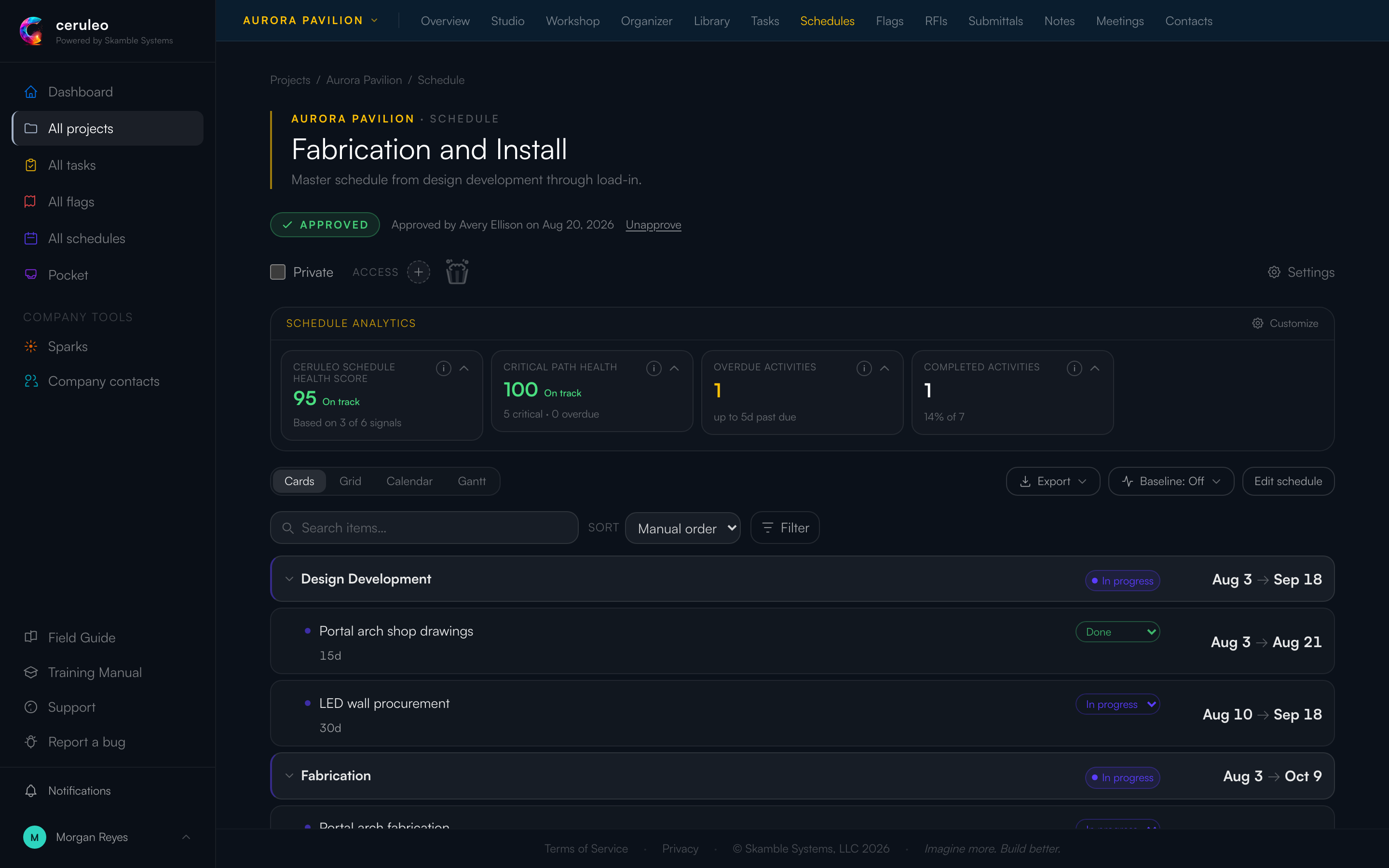
Morgan builds the master schedule in three phases - Design Development, Fabrication, Install - and wires the logic instead of the dates: shop drawings feed arch fabrication (finish-to-start, two days of lag for the print shop); monolith fabrication can start ten days after arch fabrication starts (start-to-start - the shop can parallelize once the first rhythm is set); everything converges on load-in, and load-in feeds the one milestone, Load-in complete. Avery approves it, and that approval line - who, when - stays on the page.
As the project grows, this becomes the seed of a family: when the install crew comes aboard, they will keep their own schedule on a seven-day site week, its first item hanging from this schedule's "Load-in complete" milestone - their planning, their rhythm, wired to Morgan's dates at exactly one point.
Then reality: the powder-coat vendor slips. "Queue rails powder coat" runs past its finish date and the schedule says so - overdue count up, health score down from 100. Nobody re-paints the schedule to look better; the overdue item is an honest signal wired to a real conversation with a real vendor. Riley, assigned to the fabrication items, sees them on their own plate without ever opening the Gantt.
Baselines: the memory of the plan
The live schedule always shows the current truth - which means it quietly forgets what you originally promised. A baseline is how the schedule remembers: a named, frozen copy of every item's dates, captured at the moment you save it. Select a baseline and the views show the drift - where reality has pulled away from the plan you committed to.
Two facts make baselines safe to use without anxiety:
- A baseline is a copy, not a reference. The instant you save one, it is carved off from the live schedule. Editing dates afterward - including every autosaved change - touches only the live schedule. Nothing you do later can alter a baseline you already saved.
- Capture is instantaneous and whole. Whatever the schedule says at the moment you click save is exactly what the baseline holds - no more, no less.
That makes the order of operations simple. The rhythm:
- When a plan is agreed (typically right at approval), capture a baseline and name it for the moment: "Contract baseline," "Approved plan v1." This is the promise, frozen.
- Work happens. Dates move, items slip, the live schedule stays honest. The baseline does not move - that gap is the information.
- When you re-plan, finish all the date and dependency changes first, re-approve the schedule, and then capture a new baseline named for the event: "Re-plan after venue slip." The new baseline records the new promise; every older baseline still records its own era, untouched.
One special case: if you are about to re-plan a schedule that was never baselined, capture one before you start editing - a last-chance snapshot of the old plan - then edit, then capture the new plan when it settles. Saving a baseline is the schedule creator's or an admin's move; baselines can be renamed or deleted later, but never edited - by design, there is no way to rewrite a promise.
Decision rules
Rule: wire dependencies for everything the team can articulate as "X waits on Y." Four types (finish-start is 90% of life; start-start for parallelizable work; finish-finish and start-finish for the rare rest) plus lag days. Adding a dependency flips the successor to auto - that is the point.
Cost of choosing wrong: a schedule with hand-set dates and no logic must be re-fitted by hand after every slip, so it stops being re-fitted, so it stops being believed. A schedule with fake dependencies ("everything blocks everything") re-flows into nonsense. Wire what is true, only what is true.
Rule: one schedule per team-that-plans-together; hand-offs as cross-schedule dependencies. If two groups argue about working days, ownership, or approval, they want two schedules. Keep each schedule small enough for its lead to defend every line, and connect them only at the true hand-off points - usually a milestone on each side.
Cost of choosing wrong: the 200-item monolith is owned by everyone and maintained by no one; siloed schedules with no cross-links drift until the install crew discovers the slip in a hallway. Both failures look like "scheduling doesn't work here" - the fix is structural, not more discipline.
Rule: pick your view by the job, and know that dependency editing lives in Cards. Cards to build and wire; Grid to bulk-review; Calendar to talk to people who live in weeks; Gantt to see the shape and the slack. They are lenses on one schedule, not competing schedules.
Rule: approve when people outside the room will rely on it - and treat revoked approval as information. A schedule only the builders read can live in draft happily (drafts are hidden from collaborators by default; there is a toggle when you want early visibility). The handshake matters the day a vendor, a client, or another team plans against your dates. When an edit knocks the schedule back to draft, that is the tool telling you the reliers need to hear about the change - re-approve after the conversation, not instead of it.
Rule: let overdue be visible. The health metrics (score, critical-path health, overdue, completed) are diagnostics, not grades. An overdue item surfaced early is the cheapest problem you will have all week; an overdue item hidden by quietly re-dating it costs you the schedule's credibility, which is the only currency a schedule has.
⚙ Make it yours - per schedule: working days (a five-day shop and a seven-day install crew can coexist as separate schedules), a display color, privacy for sensitive planning, draft visibility to collaborators, and a switch to block incoming dependencies from other schedules when a schedule must stay self-contained. The org-wide All Schedules view (filterable by program) reads across every schedule in the portfolio. The one thing that never bends: edits to an approved schedule revoke the approval. That is the scaffolding.
Troubleshooting
- "I can't drag this item's dates." It has a dependency - it is auto. Change the predecessor, the lag, or remove the dependency if the logic was wrong. Don't fight derived dates; fix the derivation.
- "The schedule went back to draft and nobody knows why." Someone edited an approved schedule - the revocation is automatic and the edit history says who. Batch remaining changes, talk to whoever relies on the dates, re-approve once.
- "Our schedule is 200 items and unreadable." That is two or three schedules wearing one name. Split by team (see "Many schedules, one web of logic"), keep the hand-offs as cross-schedule milestone dependencies, and let All Schedules be the overview.
- "Mobile shows the schedule but I can't edit it." By design - phones read schedules and complete items (the site gesture that matters); construction of logic stays on the web where the views live.
Mechanics - creating schedules and items, the dependency modal, baselines, approval requests, and the four views are covered click-by-click in the in-app Field Guide → Schedules.
The admin's half: schedules across the company
Approval discipline is a culture you set, not a switch: decide who approves (the approver need not be the builder - an outside eye catches wishful logic), and defend the revoke-on-edit behavior when teams complain about it. The complaint is always "re-approving is annoying"; the alternative is approved schedules nobody can trust.
The org-wide All Schedules view, filtered by program, is your portfolio lens - the place to see one program's projects converging on the same season, and to notice the project whose schedule is still in draft three weeks before its dates matter.
⚙ Make it yours - schedule access is part of the per-project permission grid and your permission templates (see the Members chapter): crews that live in the schedule get edit, clients usually get view of approved schedules only (the draft-visibility toggle stays off), and the reviewer-style middle ground is rarely needed here. Set the template once; stop deciding per person.